I Typed a Train Company’s Address. Six Intermediaries Later, Someone Had Earned a Commission. (#23)
September 21, 2026


I typed thetrainline.com into a clean browser. I clicked nothing. Seventeen seconds, ten redirects, and six intermediary domains later, I arrived at Trainline’s website carrying affiliate tracking, and Trainline’s affiliate system recorded a partner as delivering that customer.
No partner delivered anything. I typed the address myself.
This is affiliate hijacking, and the extension doing it is live in the Chrome Web Store today. It has 60,000 users.
This isn’t a story about a rogue extension that got removed. It’s still there.
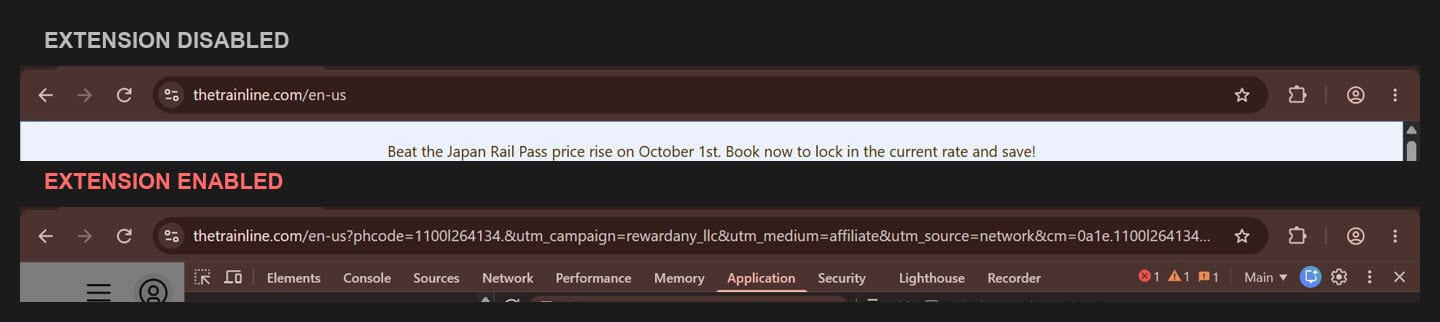
Same typed address. The only difference is one browser extension.
On 16 September 2026, over a US connection, I set up a fresh Chrome profile. No accounts signed in. One extension installed: Cashback Ninja, published in the Chrome Web Store by a developer listed as “Advantage”, 60,000 users, last updated 10 August 2026.
I added it to Chrome and did one thing: switched on its auto-cashback setting, which ships switched off. I didn’t create an account, enter an email address, or give it any way to pay me.
I ran it twice.
First, with the extension disabled. I typed the address. I landed on thetrainline.com/en-us. Clean URL, no parameters, no affiliate cookies.
Then, with it enabled. Same profile, same typed address, same everything. I landed on:
thetrainline.com/en-us?phcode=1100l264134.&utm_campaign=rewardany_llc
&utm_medium=affiliate&utm_source=network&cm=0a1e.1100l264134
&phcam=1100l229&~campaign_id=1100l229&~click_id=1101lDQZrXme
&pztracking=true&app_clickref=1101lDQZrXme
The only variable was the extension.
That control run matters more than the result. Without it, this is an anecdote about a strange URL. With it, it’s a demonstration.
Part 1: extension disabled. Part 2: extension enabled. Watch the address bar.
Chrome records every hop in its history database, which is useful, as the address bar only shows each one for a moment and the history page only shows where you ended up. Here’s the whole thing, from 08:04:36 to 08:04:53 UTC:
1. What I typed
http://www.thetrainline.com/2. The extension’s own domain
https://l.cashbackninja.top/?subid=cash_ninja&surl=https%3A%2F%2Fthetrainline.com%2F
&durl=https%3A%2F%2Fn-tab.pro%2Fgo%2F%3Fp%3D0Hu30uhJ0QL2%26subid%3Dcash_ninja
%26durl%3Dhttps%253A%252F%252Fthetrainline.com%252F
3. Intermediary: n-tab.pro
https://n-tab.pro/go/?p=0Hu30uhJ0QL2&subid=cash_ninja
&durl=https%3A%2F%2Fthetrainline.com%2F
4. Intermediary: monetoad.com
https://monetoad.com/h/0Hu30uhJ0QL2?url=https%3A%2F%2Fthetrainline.com%2F&s=cash_ninja5. monetoad.com hands off to pickalink.com
https://monetoad.com/v1/go/?deeplink=https%3A%2F%2Fwww.pickalink.com%2Fclick%2Ftrainline
%3FpubId%3D10592%26pId%3D10592%26subId%3D3Celx3GyJqPakoLWK96aZNVMBh3tvQBFv5t43fNDem0dii
%26spId%3D232147&p=q69w38pm50
6. Intermediary: pickalink.com
https://www.pickalink.com/click/trainline?pubId=10592&pId=10592
&subId=3Celx3GyJqPakoLWK96aZNVMBh3tvQBFv5t43fNDem0dii&spId=232147
7. Into a RewardAny member account
https://www.rewardany.com/store/trainline?subId=442364650&userId=104608. RewardAny hands off to Partnerize
https://www.rewardany.com/shopnow/trainline?d=928490819
&clientTime=9%2F16%2F2026%2C01%3A04%3A43&trackingCode=837268762
&trackingLink=https%3A%2F%2Fprf.hn%2Fclick%2Fcamref%3A1101l3y4ew%2Fpubref%3A837268762%2F
9. Partnerize
https://prf.hn/click/camref:1101l3y4ew/pubref:837268762/10. Trainline’s own affiliate redirect handler
https://www.thetrainline.com/pzaffiliate/redirect?phcode=1100l264134.
&utm_campaign=rewardany_llc&utm_medium=affiliate&utm_source=network
&cm=0a1e.1100l264134&phcam=1100l229&~campaign_id=1100l229
&~click_id=1101lDQZrXme&pztracking=true&app_clickref=1101lDQZrXme
11. Where I landed
https://www.thetrainline.com/en-us?phcode=1100l264134.&utm_campaign=rewardany_llc
&utm_medium=affiliate&utm_source=network&cm=0a1e.1100l264134&phcam=1100l229
&%7Ecampaign_id=1100l229&%7Eclick_id=1101lDQZrXme&pztracking=true
&app_clickref=1101lDQZrXme
(Line breaks added for readability. Nothing else is altered, and the full unbroken strings are in my browser’s history database exactly as shown.)
Watch what happens to the extension’s identity.
At hops two, three, and four, it’s completely open about itself: cashbackninja.top, subid=cash_ninja. It isn’t hiding.
By hop nine, it’s gone.
What reaches Trainline is a Partnerize click, camref 1101l3y4ew, attributed to rewardany_llc. There is nothing in that to suggest a browser extension was involved, and nothing to suggest the customer typed the address directly. It looks like a cashback partner sent a shopper. That’s what the merchant pays for.
I wrote in a recent piece that extensions don’t appear in your reporting as extensions, as they monetize through subnetworks and intermediaries. This is that, hop by hop, with timestamps.
Trainline is the cleanest example, as I have it on video with a control run. It isn’t the only one.
Strawberrynet. I typed strawberrynet.com. I landed on strawberrynet.com/en-US?clickref=…&campaign=phg&utm_source=takeads&utm_medium=affiliate, with affiliate, referrer, deduplication_cookie and _pz_clickref cookies set. Same extension, same method, first visit to the domain.
Two merchants, two different affiliate identities. At Trainline, the visit is attributed to RewardAny. At Strawberrynet it arrives through TakeAds. That’s the part worth noticing. This isn’t one partner account behaving badly or one relationship a merchant could simply switch off. The extension routes different stores through different affiliate identities, and in both cases the merchant only sees the last one.
Cashback Ninja is published by a developer listed as “Advantage”, with a personal Gmail address as its contact. Version 1.0.0.6, last updated 10 August 2026. It injects scripts into every page you visit, at document_start, before the page has finished loading.
It requests:
"permissions": ["webRequest", "declarativeNetRequestWithHostAccess",
                "cookies", "storage", "tabs", "alarms"],
"host_permissions": ["http://*/*", "https://*/*"]
declarativeNetRequestWithHostAccess is the permission to rewrite and redirect network requests. cookies is read and write access to cookies on any site. http://*/* and https://*/* mean every page on the web, not only the stores it has deals with.
That is the capability to do exactly what I observed, declared openly in the package, available to anyone who looks.
And you can look. I have published the tool I used to read that package: crx-fingerprint. It downloads an extension straight from Google’s own update endpoint and prints its permissions, its content scripts and every external host hardcoded in its code, without installing it and without running any of it. One Python file, no dependencies, MIT licence. The permission block above is its output for this extension, and you can reproduce it in about thirty seconds.
In August, Google removed an extension called Color by Fardos from the Chrome Web Store. On paper, it was a color picker. In practice, it intercepted clicks from paid search, organic results, and other affiliates, and added its own affiliate tracking on top.
Color by Fardos requested two permissions: storage and activeTab. activeTab only grants access when the user actively invokes the extension.
Cashback Ninja requests webRequest, declarativeNetRequestWithHostAccess and cookies, across every site, with no user invocation required.
The extension Google took down asked for less than one that’s still listed.
Three things, because the story is strong enough without stretching it.
This isn’t happening to people who never opted in. Cashback Ninja ships with auto-cashback switched off. Its privacy policy says so, and I confirmed it in a clean profile before touching any settings: the stored value is false. A user turns it on once, and from then on every visit to a store on its list is monetized with no further action. That first choice is real, and I’m not going to pretend otherwise.
But be clear about who agreed to what. The user agreed to automatic cashback. The merchant agreed to pay partners for referrals. Nobody agreed that a customer typing the address into their own browser counts as a referral.
And in my test, there was no cashback to give. I had no account, and the extension had no way to pay me. The tracking was set anyway. Had I bought a ticket, the commission would have gone to a partner, with no account through which any of it could have reached me.
I don’t know who operates this extension. The domains in the chain are registered behind privacy protection. Hosting is commodity cloud in Frankfurt. None of that tells you anything, and plenty of legitimate businesses look identical.
I’m not suggesting RewardAny did anything wrong. More on that below.
Something in the extension’s own storage is worth knowing about. It keeps a record:
tc_last_usage = {"strawberrynet.com": 1789544427046,
                 "thetrainline.com": 1789545874482}
Each store it monetizes, with the time it did so. It won’t do it again to the same store for some period afterwards. Clearing your cookies doesn’t reset it, as the state lives in the extension rather than on the site.
The practical effect is that it doesn’t fire on every visit. It takes a store occasionally and then leaves it alone.
I’ll leave you to think about what that does to a merchant’s chance of spotting it in their own data.
The extension doesn’t pick stores on the fly. It downloads a list and keeps it in local storage. This is the list Cashback Ninja held on 16 September 2026, immediately after I installed it:
I tested two of these, Trainline and Strawberrynet. I haven’t tested the other eleven, and I’m not suggesting any of these merchants has done anything wrong. They’re the ones on the receiving end. Being on the list means the extension is set up to monetize visits to their store, the way it did with the two I tested.
The list is fetched from a server, so it will change. If you run one of these programs, the first check further down takes about twenty minutes.
Hop seven passes through rewardany.com, and the visit that arrives at Trainline is attributed to rewardany_llc.
RewardAny is a functioning cashback website, operated by Rewardany Tech Inc. It has its own browser extension, described in its own terms and conditions. That extension is not Cashback Ninja, which is published by a different developer entirely.
I wrote to Rewardany Tech Inc. before publishing. It told me it has no relationship or affiliation with Cashback Ninja and doesn’t engage with it through any method. It declined to discuss the member account in hop seven, citing its privacy policy, and thanked me for bringing the matter to its attention. It didn’t address the other domains I asked about, including pickalink.com, the one that passes traffic to RewardAny.
Taken at face value, that means Cashback Ninja isn’t RewardAny’s extension, and its traffic reaches RewardAny through a member account. My visit, from someone with no RewardAny account, was credited to userId=10460. RewardAny says it shares the majority of its commission with members as cashback, so any cashback from a purchase would have accrued to that account, not to me.
RewardAny’s own terms say its program is for “individuals only (i.e. no attempts by automated machines/computers to accumulate Cash Back),” and that fraud or abuse can get an account terminated and its cashback forfeited. A browser extension routing strangers’ visits into a member account is hard to square with that. On this reading, RewardAny is one more party whose system is being used, not the one doing the using.
Strip out the technical detail, and the commercial position is simple.
A customer who already knew your brand, who typed your address into their browser, arrives looking like a partner referral. You pay commission on the sale. You would have had the sale anyway.
Worse, you can’t see it. The extension’s name appears nowhere in your reporting. What you see is a cashback partner with a decent conversion rate, which is exactly what a good partner looks like. And because it throttles itself per store, the volume never spikes hard enough to look wrong.
This isn’t confined to small merchants. Trainline, Trip.com and Kiwi.com are all on the extension’s list.
Five things, none of which require buying anything.
Look at what actually loads on your site. Install the shopping extensions your customers plausibly have, on a clean profile, and browse your own store. Watch the address bar. That’s the whole test, and it takes twenty minutes.
Read the package, not the listing. Everything an extension is permitted to do is declared in the package it publishes, and you can download and read that without installing it. The tool I used for this article is public, and it’s one command per extension. A store listing tells you what a product is for. The package tells you what it is able to do. Those are not the same question, and only one of them has an answer you can verify.
Check your partners’ conversion paths, not their conversion rates. A partner converting almost entirely at or near the destination, with very short click-to-order times, is worth understanding properly.
Read your program terms against what you actually permit. Most terms address paid search and trademark bidding in detail. Very few say anything about browser extensions, sub-affiliate transparency, or stand-down rules when another partner is already present. If your terms don’t cover it, you haven’t permitted it or prohibited it: you simply haven’t decided.
Ask your network what a given partner’s traffic actually is. Not what category they’re filed under. What fires, when, and whether a user action is required.
Ask your network for the click source. Not the partner name, the actual path: which publisher, which sub-publisher, and whether the click was generated by a browser extension. In this case, the network is Partnerize, and the camref and click IDs in the URL are exactly what they need to trace it.
Reverse where your terms allow. Commission paid on a customer who came to you directly isn’t a referral fee. It’s a leak.
Report the extension to Google. Every Chrome Web Store listing has an option to report it.
Close the gap in your terms. If your program terms don’t address browser extensions, sub-affiliate transparency, and stand-down rules, write them in. You can’t enforce a rule you haven’t made.
Nothing I did here was difficult. A spare browser profile, a free extension, and Chrome’s own developer tools. The whole investigation took an afternoon.
If it’s that easy to find, the reason it persists isn’t that it’s hidden. It’s that looking is nobody’s job, and the person who looks is the one who has to explain why channel revenue just went down.
That’s a governance problem, not a technical one. It’s the same conclusion I reached about Phia, and I keep arriving at it from different directions.
Marcode pointed me to Cashback Ninja and provided the Color by Fardos case. The tests, redirect captures, and findings above are my own. Disclosure: I’m in discussions with Marcode about a referral arrangement, which isn’t yet in place.
Affiliate Manager Expert provides founder-led affiliate program management, audits, tracking reviews, compliance reviews, and program cleanup for SaaS, software, fintech, e-commerce, and digital product brands.
If you want to know what’s actually firing inside your program, I can help you review where it’s exposed: browser extensions, coupon leakage, partner overlap, sub-affiliate opacity, attribution rules, program terms, commission logic, and partner quality.
Book a free affiliate program review, and I’ll tell you what I find. Or see how an affiliate fraud audit works.
“To see what is in front of one’s nose needs a constant struggle.” ― George Orwell, In Front of Your Nose, Tribune (1946)
Affiliate Manager Expert LLC is a member of The Performance Marketing Association.


Leave a Reply
Want to join the discussion?Feel free to contribute!